
Workshop log · Software Projects
ObsidianWriter: The Novel Studio I Wanted
I have tried enough writing software to know what I do not want: another clever application that asks me to hand over my manuscript, adopt its filing system, and hope I can still get at my work when the clever application stops being clever.
So I am building ObsidianWriter, a private novel studio designed around the way I actually write the Thorncroft Mysteries.
The important part is not the web interface or the collection of tools. It is a rule that the whole project has to obey:
Obsidian remains the single source of truth. ObsidianWriter can organise, review and safely update the work, but the novels and their creative reference material remain ordinary Markdown files in my Obsidian vault.
That means I can work in ObsidianWriter at home, open the same scene in Obsidian on my laptop, or catch an idea on my phone when I am nowhere near my local network. The application expands my writing room without locking the door behind me.
One writing room, many volumes and no mystery about the files
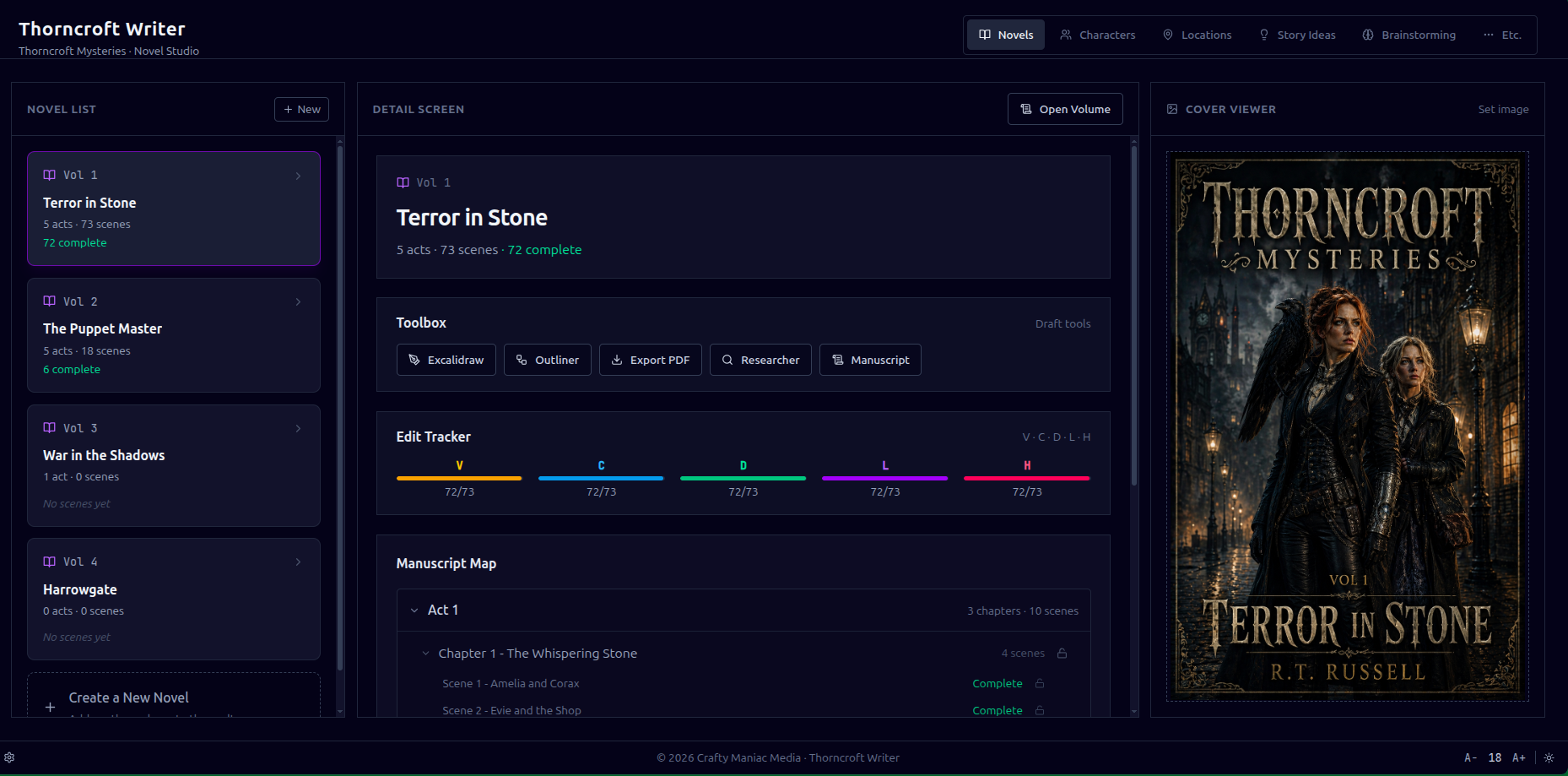
The main screen turns the vault into a working map of the series. Volumes open into acts, chapters and scenes. Progress markers show what is drafted, reviewed or complete. Character files and locations from the writer’s bible sit beside the manuscript instead of disappearing into a second database.
The application understands the structure of a novel, but it does not hide that structure. A scene is still a Markdown file. A chapter is still a folder. If ObsidianWriter vanished tomorrow, the books would remain readable and editable in Obsidian.
That is less glamorous than promising a revolutionary new document format. It is also much more useful.
A workflow built around the actual writing
The current flow looks like this:
- Capture anywhere. A note or scene can begin in Obsidian on any of my synced devices.
- Enter the manuscript through ObsidianWriter. The application presents the series as volumes, acts, chapters and scenes instead of a long folder tree.
- Draft and revise. The editor works directly with the vault-backed Markdown, with checks to stop an older browser tab from overwriting a newer version.
- Run an editorial pass when it is useful. I choose the pass, the scene and the AI provider. Nothing is dispatched without an explicit confirmation.
- Decide suggestion by suggestion. The AI can flag problems and propose changes, but it does not get to revise the novel behind my back.
- Save and confirm. ObsidianWriter preserves the previous version, writes the change atomically, and does not call the job finished until Obsidian Sync confirms it.
- Keep working elsewhere. Changes made directly in Obsidian return through Sync and appear in a Change Inbox the next time I open Writer.
The result is a loop rather than a one-way import: Obsidian → Writer → Obsidian → every device I use.
Editorial help without surrendering the keyboard
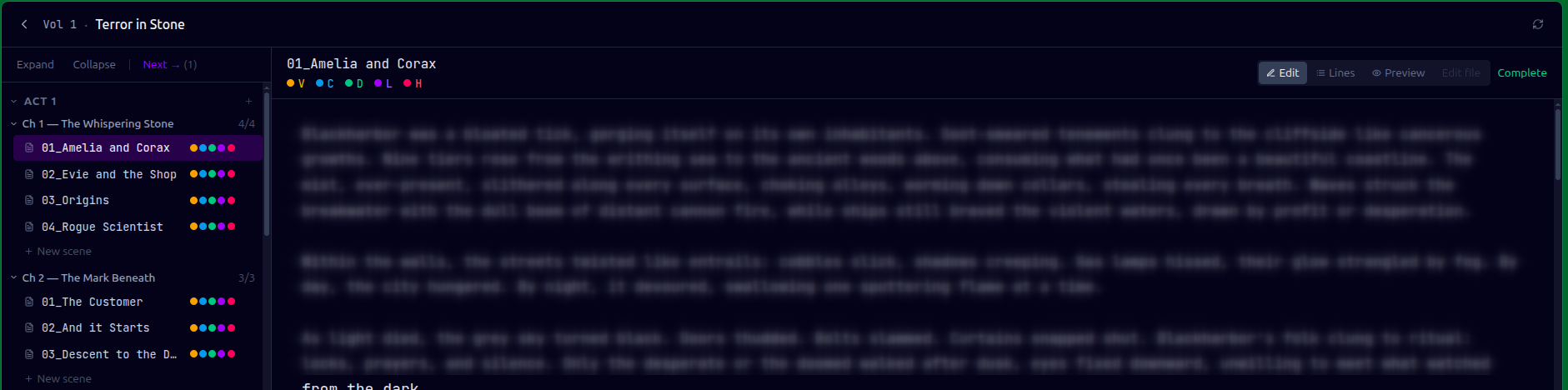
ObsidianWriter currently has five editorial passes, each with a different job:
- Victorian Audit looks for anachronisms, period language and British/Canadian spelling.
- Continuity Check compares a scene with the established characters, places and story facts.
- Developmental Review looks at purpose, tension, pacing and character movement.
- Line Edit concentrates on clarity, rhythm and repetition.
- Humanise looks for prose that has become flat, mechanical or suspiciously polished into lifelessness.
Results arrive as a review, not a replacement manuscript. I can accept, reject or edit individual suggestions, update the underlying reference material when the AI has exposed a genuine gap, and discuss a flag in a scene-aware chat before deciding what to do.
There is deliberately more than one AI route. Routine work can run locally on my server through Ollama (a local LLM). Claude and Codex can handle other jobs through the subscriptions I already use. The routing is configurable, and a failed or logged-out provider can be bypassed.
Most importantly, the writing tools continue to work when every AI provider is unavailable. Artificial intelligence is an assistant in this system, not a load-bearing wall. I use it to edit, research and brainstorm. I can’t afford human editors at this point.
Characters and places belong to the world, not the software
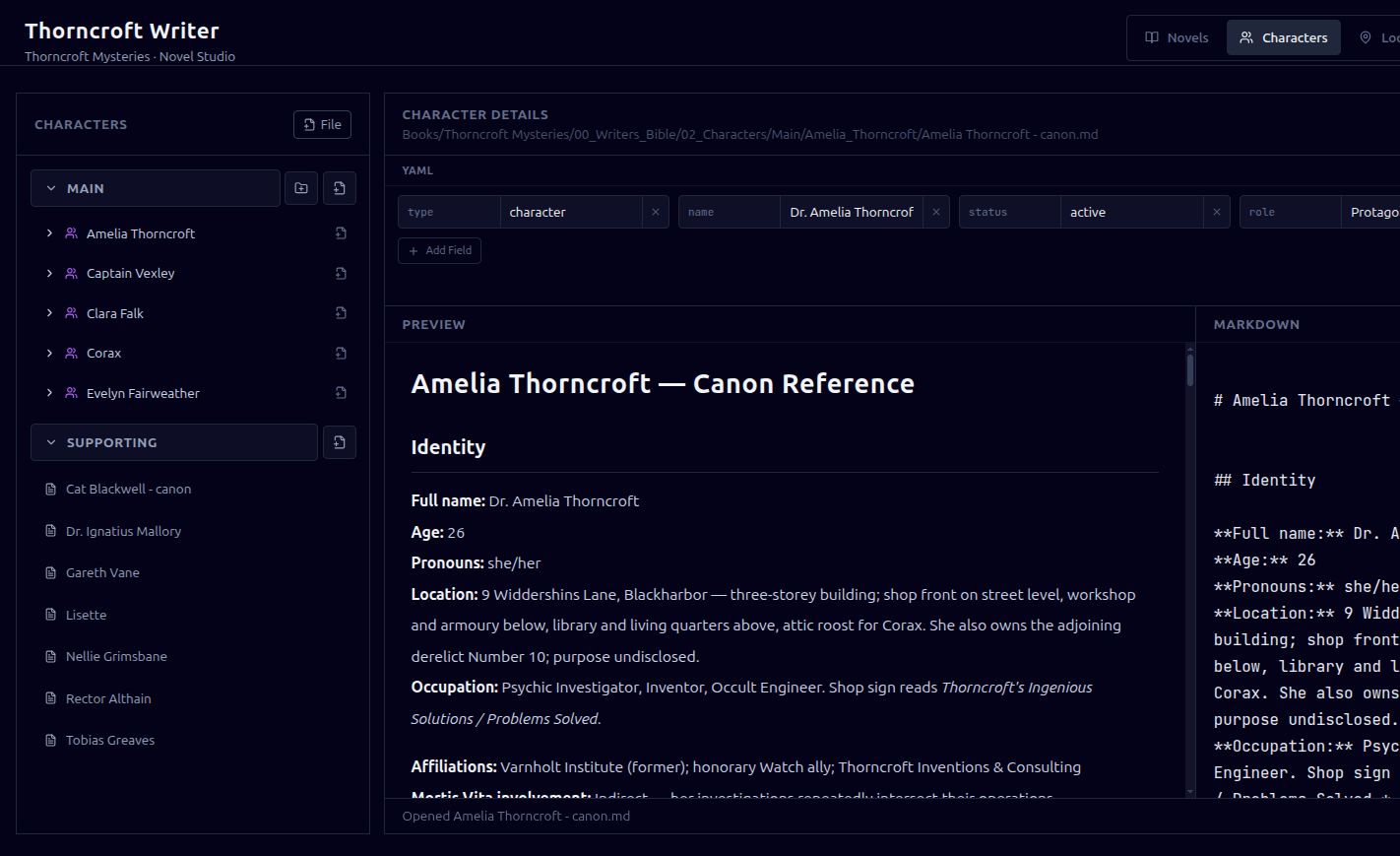
The same principle applies to the writer’s bible. Character histories, relationships, locations, magic and research remain inside the Thorncroft Obsidian vault. ObsidianWriter gives those files purpose-built screens and can include the relevant material in an editorial request, but it does not move the canon into an application-only silo.
That becomes especially important as the series grows. A continuity check should know which version of Amelia Thorncroft it is dealing with. A research note about Victorian medicine should be available to a future scene, an external AI conversation, and plain old Obsidian search. One canonical creative library is easier to trust than three almost-matching ones.
Safety is a feature, not housekeeping
Building on top of a live novel changes the definition of “works.” A save button that usually saves is not good enough.
ObsidianWriter keeps file history outside the Obsidian vault, creates verified full-vault backups outside both the vault and the application release, records an audit trail for writes, and detects revision conflicts before replacing a file. Its recovery screen can compare a previous snapshot with the current Obsidian version and restore one exact file without rolling the rest of the vault backwards.
It also distinguishes between changes made by Writer and changes that arrived from elsewhere. The Change Inbox makes external edits visible without treating them as suspicious. Editing in Obsidian is expected; the application simply tells me what changed and asks me to acknowledge that I have seen it.
There are separate development, staging and production environments. Staging is tied to a disposable test vault and announces that fact in a large yellow banner. Production is private to my home network, uses the live vault, and receives new write capabilities gradually. At the moment it can safely update existing scenes, character files and locations. Structural operations are still being tested before they earn access to the live manuscript.
That caution has made the project slower. It has also let me sleep at night.
What I am trying to build
The immediate goal is straightforward: make drafting and revising the Thorncroft novels more powerful without making the manuscript less portable, less understandable or less mine.
The longer-term ideas are considerably less restrained. I want read-aloud and speech-to-text tools, a quick scratchpad that can capture ideas from a phone, research clipping that understands characters and scenes, better worldbuilding templates, notifications for jobs that finish while I am elsewhere, and eventually publishing tools. There is even a Take a Break button planned for launching the Thorncroft Mysteries logic game , because productivity can only be endured for so long.
Some of those ideas may become features. Some may remain notes with delusions of grandeur. The architecture is being shaped so that ObsidianWriter could one day become a product for other writers, but that is not today’s assignment. Today it is a single-user tool on a private server, built for one fictional city and the increasingly complicated lives of the people who inhabit it.
The real pitch
This is not a launch announcement, and there is nothing to buy. It is a progress report from the workbench.
But if ObsidianWriter eventually has a sales pitch, I think it will be this:
Your novel should outlive your writing software. Keep the manuscript in Obsidian. Add the tools you need around it. Let automation help, never take custody.
That is the writing environment I wanted. Now I am finding out whether I can build it.
For the nerds
ObsidianWriter is a self-hosted web application running on my Linux server. The stack is intentionally made from familiar, replaceable parts:
- Frontend: React 18, Vite, Tailwind CSS, React Router and React Markdown. Lucide supplies the interface icons.
- Backend: Node.js 22 and Express. The server reads and writes the vault files, enforces revision checks and write scopes, manages authentication, and coordinates editorial jobs.
- Operational data: PostgreSQL 16 stores sessions, settings, job state, audit events and file-history metadata. It does not replace the Markdown manuscript.
- Canonical content: Markdown files in an Obsidian vault, synchronized by Obsidian Sync. A dedicated container runs Obsidian Headless so the server participates as another Sync device.
- AI: Ollama runs
qwen3.5:9blocally. Claude and OpenAI Codex are also available through the subscriptions I already pay for. A separate, locked-down Node.js runner talks to them over a private Unix socket; the application containers do not receive their credentials or direct access to the provider tools. - Deployment: Docker Compose runs the application, database and Sync services. Containers use health checks, read-only filesystems where practical, dropped Linux capabilities and private internal networks.
- Private networking: Caddy provides HTTPS and reverse proxying. CoreDNS supplies the private
rt.home.arpanames used on my local network. The application is not exposed to the public Internet. - Operations: systemd starts the application and AI runner and schedules backups. Releases are tagged and promoted from development to staging to production, with maintenance screens and rollback links instead of copying new code over the live installation.
- Recovery: Full-vault archives are stored outside the vault and application releases, verified by extraction and SHA-256 checks. Individual writes also create external snapshots and audit records before Obsidian Sync confirms the result.
- Project management: Git and Gitea hold the code and issue backlog. Projectinator, another tool I built, keeps the wider collection of projects and server work visible.
The short version is React → Node/Express → Markdown and PostgreSQL, packaged with Docker and tied back to Obsidian through Sync. PostgreSQL remembers what the application is doing; Obsidian remembers the story.