
Workshop log · Software Projects
Servo Opens Its Eyes: Pi 5, AI Camera
Where things stood
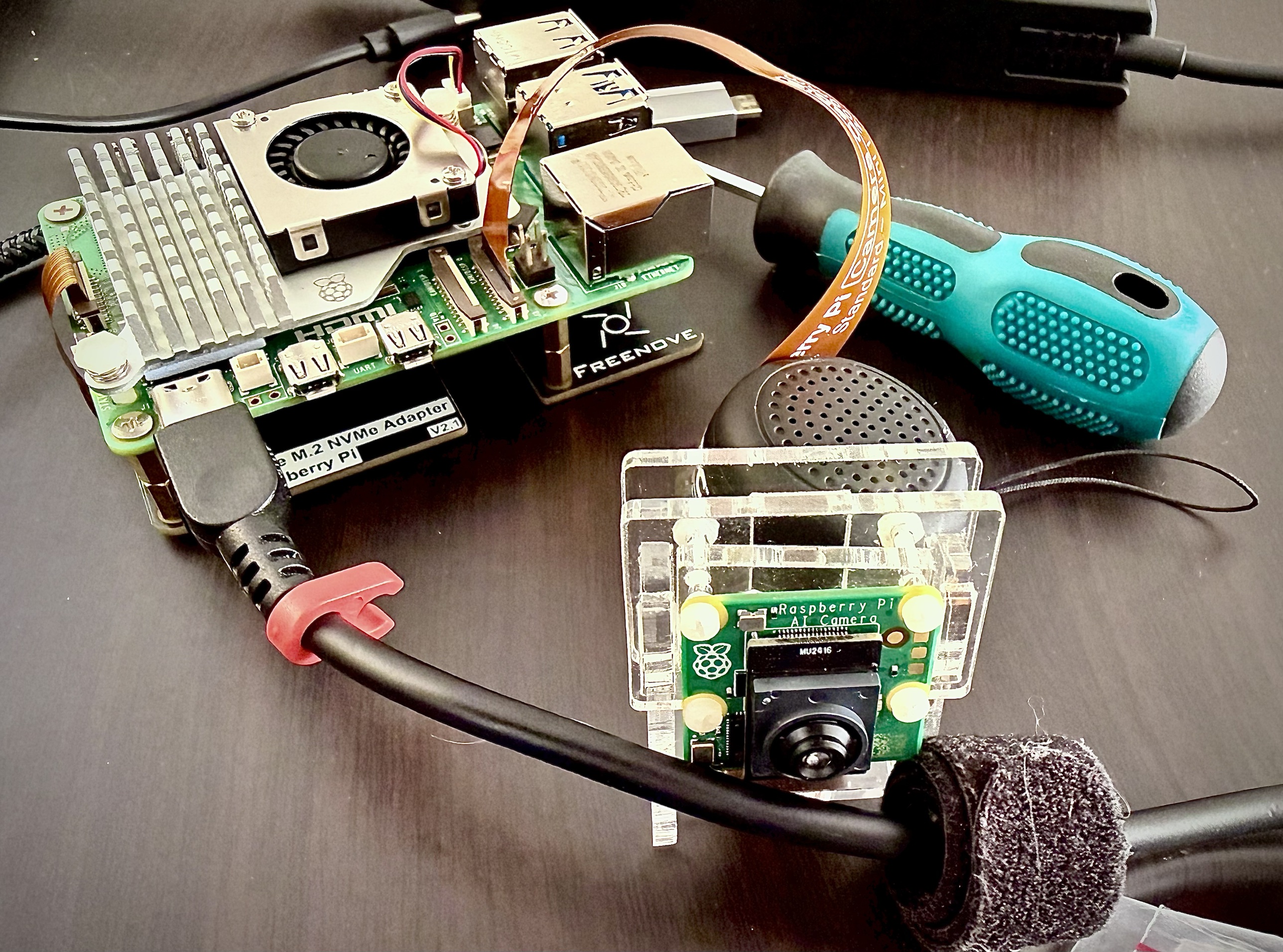
Last time , Servo went battery-powered and untethered with a browser joystick I programmed to drive it. It could move, but it had no sense of its surroundings. This post covers the Raspberry Pi 5 and the Raspberry Pi AI Camera, which are meant to fix that.
The Pi will be the on-board brain, but only as a thin client. It controls the hardware and all the IO, and the heavy model work runs on Ollama servers over wifi, so the thinking happens remotely. As I program each function I’ll see whether the lag is too high, and if it is I’ll try moving that function onto the Pi. I gave the Pi a 1 TB M.2 drive, so space isn’t a problem. Processing power, concurrent actions and battery drain will drive the final decisions.
The AI camera
The AI Camera is built around a Sony IMX500 sensor, which runs the detection model on the sensor itself. The Pi’s CPU never processes the pixels. It receives the frames plus a list of detections: a label, a confidence and a bounding box.
First tests: capture worked, and it detected a person and a couch. Telemetry from the rover and a short forward-and-stop test also worked from the Pi over wifi. The Pi isn’t mounted on the rover yet, so for now it sits on the bench.
Facial recognition will come later.
Timed square test
I tried driving a square with no encoders, just timed turns. It didn’t close the square. A 0.6 second turn came out at about 45 degrees. Turning for 1.2 seconds at L=0.35, R=-0.35 gave about 90 degrees, but only on carpet. On another surface it would be different.
Timed turns on a skid-steer chassis aren’t reliable, and encoders are the real fix. I’ve put them off until Servo proves useful. However, I feel that when the brain and cam are mounted on the rover body, it won’t need exact drive commands. Planned LIDAR and SLAM will solve the precision issue.
LIDAR (Light Detection and Ranging): A laser distance sensor the robot uses to “see” the world. It spins or sweeps a laser beam, measures how long the light takes to bounce back, and turns those readings into a simple map. For a hobby robot, LIDAR is mainly used for obstacle detection, room scanning, and smooth autonomous navigation without bumping into things.
Simultaneous Localization and Mapping (SLAM) is a foundational method in robotics, autonomous vehicles, drones, AR/VR systems, and mobile mapping. It solves the “chicken-and-egg” problem of determining a device’s location while simultaneously creating a map of its surroundings.
Streaming the camera to RoverBento
I want to see what Servo sees, with the detection boxes on top, in RoverBento, my, as yet unfinished, control dashboard. Two decisions up front:
- FPV is video only. It never opens the rover’s microphone, and while anyone is watching, the rover’s screen shows a WATCHING badge that the viewer can’t hide.
- There’s one viewer for now, the driver. Multiple viewers and handover are on the backlog.
A camera service on the Pi owns the IMX500 full time. It runs the detection model on the sensor (coco, efficientdet and nanodet, about 30 fps each), writes every frame to a virtual webcam called “Servo camera”, and publishes the detections separately. Chromium sees an ordinary webcam, so calls and FPV use it without knowing anything about detection. The relay, camera service and kiosk all start at boot as systemd services, and a full reboot brings everything back.
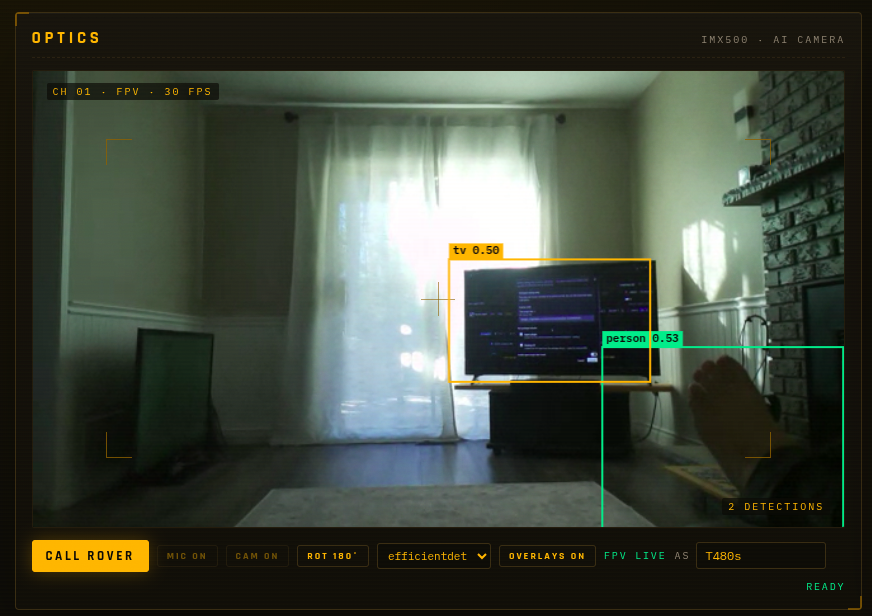
Excuse the backlighting. Actually impressed that a foot is enough to trigger identification of a person.
Problems along the way:
- Black FPV screen. FPV said LIVE but the video was black and no boxes drew. It showed up when I refreshed a connection or opened a second browser session. The rover page stops the camera when the last viewer leaves. My fix for stale connections ran that same cleanup just before the new connection was set up, so it stopped the camera and the viewer got a dead video track. Now it closes only the old connection.
- Chromium saw no cameras. The virtual camera reported both capture and output, and Chromium skips any device that can output. The fix was
exclusive_caps=1, plus making PipeWire re-scan once the camera service is feeding frames. Otherwise it probes too early. - Upside-down camera. Detection only works right-side up and the bench camera was hanging upside down, so frames are flipped on the sensor before detection.
- A “very dark” image. An error was reported that had video but no image. Turned out that something was blocking the cam. All problems should be that easy.
Stabilising the detections
The detection boxes jittered in seizure-inducing motion. Before changing any code I recorded ten seconds of real detections per model on the Pi and tested fixes against the recording. coco was sending about 2.3 boxes per frame, and the box count changed 107 times in 10 seconds.
The fix has three parts: a confidence threshold for each model, merging overlapping boxes of the same object, and smoothing boxes across frames. The result is one steady box per object.
Servo’s brain and what it can see
I added a service on the Pi that lets me “talk” to the robot brain. It’s typed for now because I haven’t finished the voice chat. The brain knows the current date and time, can search the web, reads its own sensors (battery voltage, heading, tilt, temperature) and has a shared memory, so it remembers what I tell it across restarts. Then I asked it what it saw.
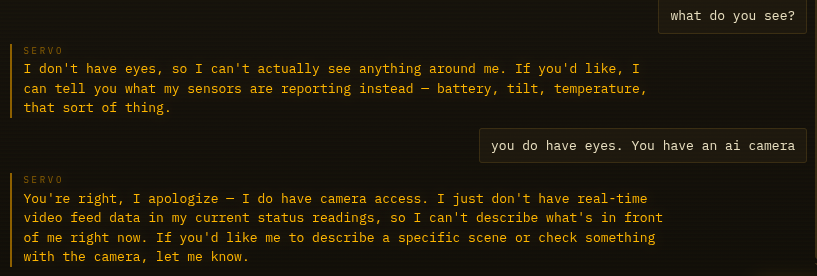
It said it had no eyes. When I told it about the AI camera it apologised and still couldn’t see anything. So I added a look tool: when asked, Servo reads the camera’s detections and answers with what and roughly where.
Later in a conversation the model stopped calling its tools altogether. Asked about its battery, it said “100%”, then “78%”. Asked what it saw, it described a door, a toilet and a bookshelf while the camera was reporting a person and a couch. Basically, when it didn’t know something, it hallucinated.
The fix was to stop leaving the decision to the generative model. Battery and sight questions are now sequenced properly: the brain runs the sensor or camera tool itself before the model answers. Servo is also told never to quote a battery percentage, because it only has voltage. After the change it answered “12.1 volts and I’m fine, not hungry” and “a couch to the left, and a person nearby”.
Two safety choices went in with it. The brain only receives labels and box positions, never images, and only when asked. Every memory write is logged with its source, and Servo won’t save a fact in a turn where it searched the web, so a web page can’t plant a lasting instruction.
Status
Working: eyes with positions, readable battery and sensor values, memory, web search and a single brain, all running on the Pi.
Pending: the Pi is still on the bench on wall power, Servo can’t move on its own, and voice isn’t connected to the rover.
Next
The estimated runtime on the rover’s 3S pack is 2 to 3 hours, which is enough for a proof of concept. After that comes voice, then a face. I’ll have to install the brain in the body, add more sensors, write more code and bang my head on my desk. Why do I do these things to myself?
New here? Start with Meet Servo: Bringing Up a Salvage-Built Presence Robot, then Off the Leash.